
gping.io1.18 - Get APK
You'll be able to download in few seconds.
Publisher Description
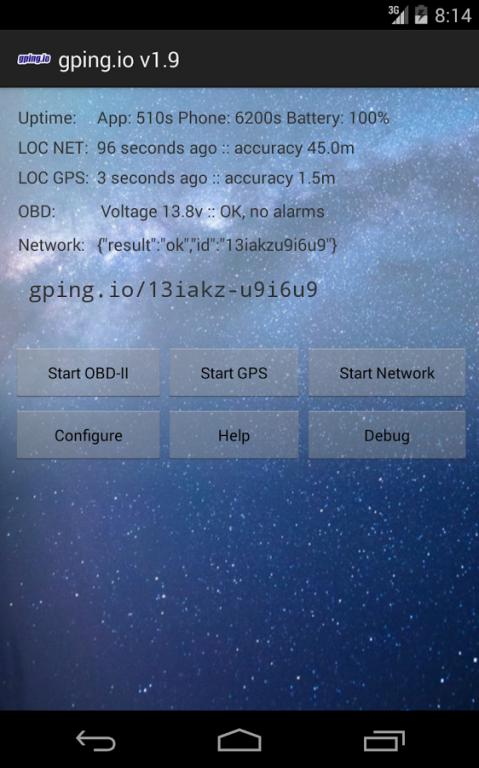
NOTE: This is not your typical consumer application. This app is intended to be used on dedicated tracking hardware connected to your car's battery.
Try the Live Demo http://gping.io for an example.
Developers: Check out the Open Source Server Software at https://github.com/dustball/gping.io
HOW IT WORKS
1. Find an old android phone. Cracked screen? Perfect-o!
2. Purchase a $5 OBD-II Bluetooth adapter (OPTIONAL)
3. Recommended: activate your device on a 'free' prepaid plan such as RingPlus. At the time of writing, Ringplus offers $0/month plans with $9 activation. Any provider will work; gping.io only needs basic data services and consumes no "minutes".
4. Install gping.io on your device & hide it somewhere in your vehicle -- anywhere you can power it! Some vehicles have additional cigarette lighter 'power ports' and even USB ports in various places. Be creative!
5. Monitor your vehicle from your web browser! Upon launch, gping.io will show you your distinctly private-but-shareable monitoring URL.
FEATURES
[x] Displays GPS tracking information (with map)
[x] Uses Parallel Location Modules to provide most possible helpful location information in all situations
* Location Module #1: Uses Network & WiFi based techniques to determine location
* Location Module #2: Uses GPS satellites to determine location
[x] Shows OBD-II information such as
* Vehicle VIN,
* Current speed,
* engine RPM,
* battery voltage (V),
* engine fault codes and other alarms,
* fuel level (%),
* distance travelled since last reset (Km),
* air temperature (C),
* and more!
[x] Developer API coming soon
* poll for information, e.g., getFuelLevel() etc.
* HTTP POST on event alarm, i.e. fuel level drops below 15%.
* Export map KML / CSV log data
Schedule:
* Every 45 seconds, check vehicle's battery level
* If vehicle is running, fetch OBD information from car
* Poll GPS depending on battery level, granularity between 1 min and 5 min
* Ping network (configurable frequency, default 60 seconds)
Compatible Bluetooth adapters:
* ELM327 MiNi OBD or any other 'Prolific' or 'FTDI' chipset device.
* Reminder: You don't need this piece, but having it will provide more features and abilities.
* Works on vehicles made by Ford, GM/Vauxhall/Opel, Chrysler, Mercedes, Volkswagen, Audi, Jaguar, Citroen, Peugoet, Skoda, Kia, Mazda, Lexus, Daewoo, Renault, Mitsubishi, Nissan, Honda, Hyundai, BMW, Toyota, Seat, Dodge, Jeep, Pontiac, Subaru and many more.
Usage Tips
- gping.io is designed to automatically start at boot (along with GPS, OBD, and Network services)
- In Wireless, Disable WiFi. Parking your car too close to a WiFi signal may cause the signal to flap between WiFi and network data. Disable WiFi to increase reliability.
- In Location & Privacy, enable both GPS satellites and Network location ("Use wireless networks").
- Enable Bluetooth if using an OBD adapter, disable bluetooth if not.
- Enable data & background data.
- Uncheck Development -> Stay Awake
About gping.io
The company that develops gping.io is Brian Klug. The latest version released by its developer is 1.18.
To install gping.io on your Android device, just click the green Continue To App button above to start the installation process. The app is listed on our website since 2016-11-12 and was downloaded 0 times. We have already checked if the download link is safe, however for your own protection we recommend that you scan the downloaded app with your antivirus. Your antivirus may detect the gping.io as malware as malware if the download link to io.gping is broken.
How to install gping.io on your Android device:
- Click on the Continue To App button on our website. This will redirect you to Google Play.
- Once the gping.io is shown in the Google Play listing of your Android device, you can start its download and installation. Tap on the Install button located below the search bar and to the right of the app icon.
- A pop-up window with the permissions required by gping.io will be shown. Click on Accept to continue the process.
- gping.io will be downloaded onto your device, displaying a progress. Once the download completes, the installation will start and you'll get a notification after the installation is finished.
Program Details
System requirements
Download information
Pricing
Version History
version 1.18
posted on 2016-11-12
1.18,- Supports promo codes,1.17,- New: Use your own server,- New: SSL Encryption (HTTPS),- In-app subscription $1.99/mo to unlock the above,1.10,- (experimental) backwards compatible support for Adroid 2.1 Eclair (API 7),- possible fix for crash in main,- no longer issues potentially confusing URLs (i.e. '0's vs '0's)
Disclaimer
External Download
We do not host gping.io on our servers. We did not scan it for viruses, adware, spyware or other type of malware. This app is hosted by Galad and passed their terms and conditions to be listed there. We recommend caution when installing it.
The APK Download link for gping.io is provided to you by apps112.com without any warranties, representations or guarantees of any kind, so access it at your own risk.
If you have questions regarding this particular app contact the publisher directly. For questions about the functionalities of apps112.com contact us.
